A quiet phone call with a spooky background detail
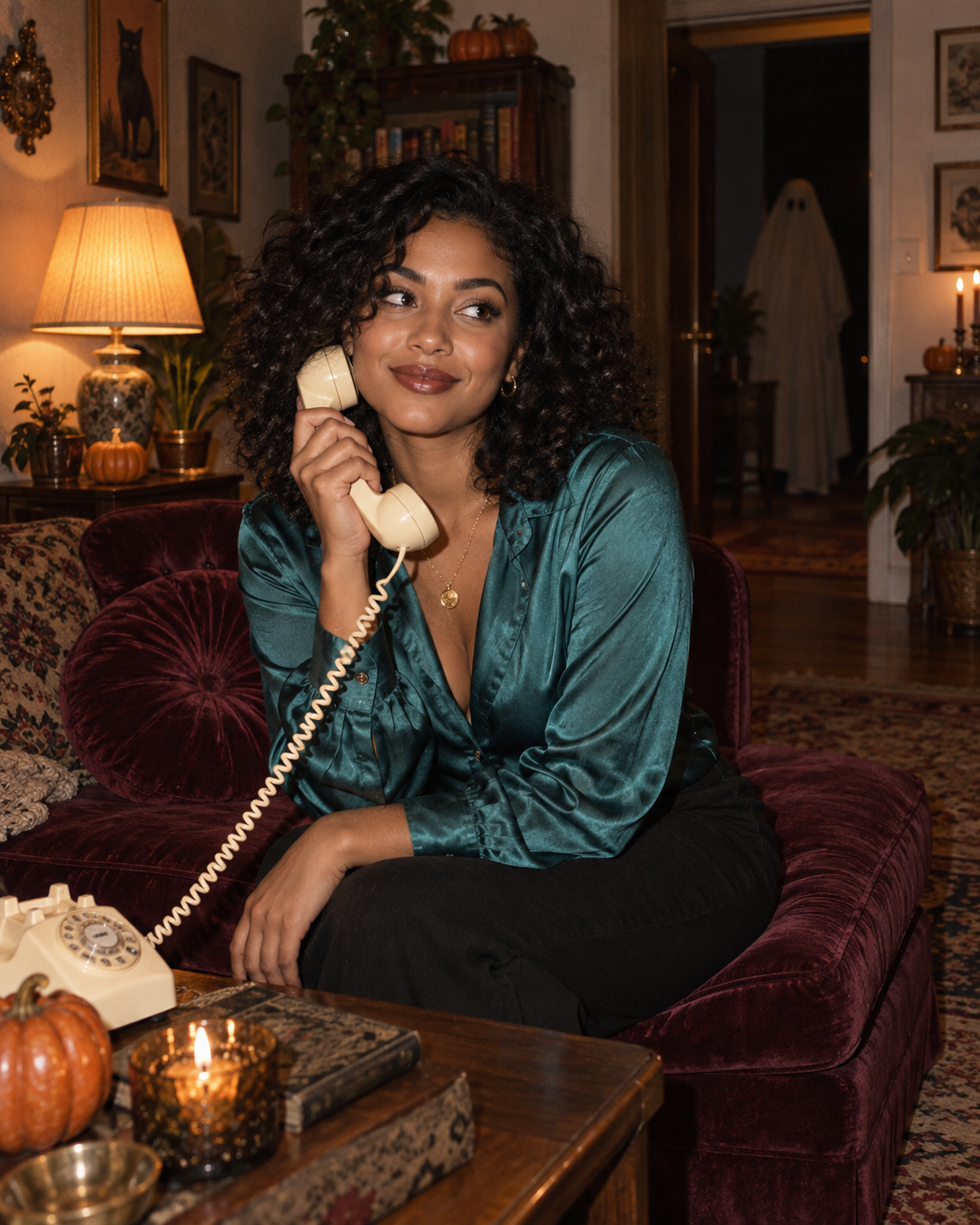
Step into a nostalgic Halloween scene with a vintage telephone, warm lamplight and a distant ghost. Upload one clear portrait to personalise the main character. The example shows the intended composition. Your uploaded photo provides the identity; the template provides the scene and styling. Generated likeness and small details can vary, so review the result before sharing.
A quiet phone call with a spooky background detail
The foreground portrait carries the story: an ivory telephone, teal clothing and warm lamplight set against burgundy furnishings. A distant, softly blurred ghost adds a second discovery without competing with the face. The result suits a seasonal profile post or a character portrait with a little narrative.
Choose a sharp, front-facing or slightly turned head-and-shoulders photo. Keep both eyes, the hairline and jaw visible. A phone is not needed in your upload; the template already supplies it.
Make this look with one photo
The template instructions are applied automatically. You do not need to write or copy a prompt.
Choose a clear identity reference
Choose a sharp, front-facing or slightly turned head-and-shoulders photo. Keep both eyes, the hairline and jaw visible. A phone is not needed in your upload; the template already supplies it.
Open Remix and upload your photo
Use this template’s Remix button, then upload one photo of one person. The template image is supplied automatically as the visual base. Avoid uploading a collage or several different people.
Review the settings before generating
The intended composition is 4:5. Check the available settings and credit estimate in the creator before starting. The main subject is personalised while the template scene is retained.
Check the result and save
Compare the eyes, nose, jaw and hair with your photo. The warm light can change colour appearance, but the face should still read as the same person. Reject a result where the receiver hides an eye or merges with a hand. A clearer input with less head tilt may help on another attempt. Save a version you are happy with; another attempt may produce different details.
Get a more convincing result
Small source-photo choices are more useful than adding complicated instructions.
Check the face before the atmosphere
Compare the eyes, nose, jaw and hair with your photo. The warm light can change colour appearance, but the face should still read as the same person.
Keep the telephone below the face
Reject a result where the receiver hides an eye or merges with a hand. A clearer input with less head tilt may help on another attempt.
Start with a clean reference
Use an unfiltered photo with one clear face. Tight crops, strong beauty filters and objects across the face can make identity transfer harder to assess. Keep the original photo for comparison.
Before you remix
Do I need to hold a phone in my photo?
No. The scene supplies the phone and pose. Upload a clear face reference without props covering the features.
Will the ghost take my face?
The instructions target only the foreground person. Review the doorway to make sure the background figure remains indistinct.
Can I use a male portrait?
Yes. The identity reference can be any adult; the template keeps its scene and costume while adapting the main subject.
Do I need to enter a prompt?
No. This template supplies its instructions automatically. Upload one photo and review the available settings before starting.
Continue creating
Explore a related Halloween look, refine a detail, or try a separate image model.
Halloween collection
Browse the full seasonal collection and choose a different visual treatment.
Vampire Aristocrat Portrait
Choose a closer, candlelit costume portrait if you want the face to dominate the composition.
Image editor
Refine a small visual detail or prepare another source photo for a new attempt.
GPT Image 2.5 Sunburst
Explore this separate image-model page for another project. Opening it does not change this template’s Remix preset.